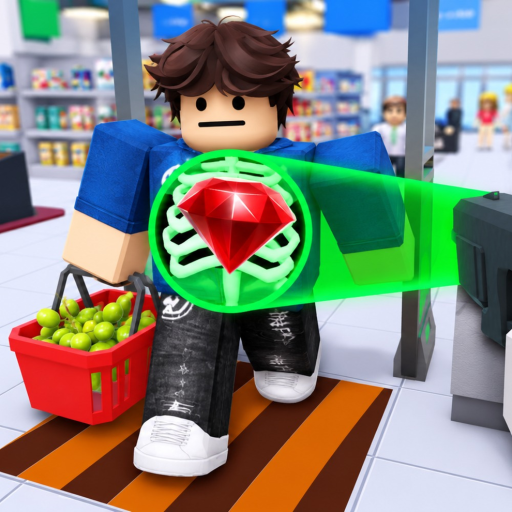
Use for a complete match
Aim at the green side only after the receipt item names and quantities match the basket.
The two analyzed videos use PC. This page records only inputs that are visible in prompts or the interface and keeps touch and controller mappings outside the table.
At the exit scanner, aim at the green PASS or red ARREST side, then press E. Numbered hotbar slots 1–9 are visible. X is shown for X-ray Vision, while M, G, and Z are labels attached to paid world offers.
A visible hotbar number confirms the interface slot, but not every physical key press. Rows below say exactly what the footage preserves.
| Action | Input shown | When to use it |
|---|---|---|
| Context interaction | E | Shown on several world prompts |
| PASS a customer | Aim at PASS, then press E | Use only when the receipt and basket match |
| ARREST a customer | Aim at ARREST, then press E | Use when an item is missing from the receipt |
| Choose a hotbar slot | Numbered slots 1-9 are visible | The footage shows the numbered bar, not every key press |
| Toggle X-ray Vision | X | Shown beside the X-RAY VISION status |
| World-offer shortcuts | M for Mini Gun, G for RPG, Z for Combat Drone | These labels open or select paid offers; purchase still uses the Roblox dialog |
| Return after a successful ending | Any key | The ending screen explicitly shows this instruction |
Aim at the green side only after the receipt item names and quantities match the basket.
Aim at the red side when the basket contains an item missing from the receipt, then continue with handcuffs and JAIL.
Two different Robux prices appear across the videos.
Two different Robux prices appear across the videos.
The offer is visible, but the item is not purchased or tested.
No touch button layout or controller prompt is readable in the supplied videos. On those devices, use the current prompt shown beside the interaction. If a platform displays no prompt, reconnect or check the Roblox control menu before assuming the PC key has a direct equivalent.
Open the guide hub if the next problem is receipt judgment, a thief route, or later-day survival instead of platform controls.
The recorded PC prompts use E. At the exit, aim at PASS or ARREST and press E for the chosen action.
After the item was purchased in the analyzed footage, an X label appeared beside X-RAY VISION. Activating it showed item icons through the surrounding scene.
The world-offer labels associate M with Mini Gun, G with RPG, and Z with Combat Drone. These are paid-offer shortcuts, not proof that the item is owned or free.
The two supplied videos do not preserve touch or controller prompts. Follow the current on-screen label on those platforms; this page does not translate the PC keys into guessed bindings.